<?xml version="1.0" encoding="utf-8"?><feed xmlns="http://www.w3.org/2005/Atom" xml:lang="en"><generator uri="https://jekyllrb.com/" version="4.4.1">Jekyll</generator><link href="https://www.andrewapperley.ca/feed.xml" rel="self" type="application/atom+xml" /><link href="https://www.andrewapperley.ca/" rel="alternate" type="text/html" hreflang="en" /><updated>2026-05-25T21:03:59+00:00</updated><id>https://www.andrewapperley.ca/feed.xml</id><title type="html">Senior iOS Engineer | Technical Lead | AI Product Builder</title><subtitle>Senior iOS engineer with 10+ years shipping high-impact mobile products at Dropbox, Pinterest, and Shopify. Deeply invested in AI tooling and on-device intelligence.</subtitle><author><name>Andrew Apperley</name><email>mail@andrewapperley.ca</email></author><entry><title type="html">I stopped writing code by hand. Here’s what replaced it.</title><link href="https://www.andrewapperley.ca/blog/ai/ios/workflow/engineering/2026-05-20-switching-to-ai-workflow/" rel="alternate" type="text/html" title="I stopped writing code by hand. Here’s what replaced it." /><published>2026-05-20T13:00:00+00:00</published><updated>2026-05-25T21:03:47+00:00</updated><id>https://www.andrewapperley.ca/blog/ai/ios/workflow/engineering/switching-to-ai-workflow</id><content type="html" xml:base="https://www.andrewapperley.ca/blog/ai/ios/workflow/engineering/2026-05-20-switching-to-ai-workflow/"><![CDATA[<p><em>On AI-assisted development, why the mental model shift matters more than the tooling, and what happens when you point an agent at the iOS Simulator.</em></p>

<p>For most of my career, writing code was the job. Researching an approach, sketching a design, then sitting down and translating intention into Swift, line by line. That loop — think, type, compile, test, repeat — was so fundamental to how I worked that I didn’t really think of it as a <em>method</em>. It was just what programming looked like.</p>

<p>That changed at Dropbox. Not overnight, and not because someone handed down a mandate. It changed because I started using AI tools seriously, and somewhere in the middle of a long feature build on Dash, I looked up and realized I hadn’t typed a significant block of code in several days. I’d been directing, reviewing, correcting, and composing — but not transcribing. The ratio had completely inverted, and the output was better for it.</p>

<p>This is the post I wish I’d had at the start of that shift.</p>

<h3 id="what-ai-assisted-development-actually-means-day-to-day">What “AI-assisted development” actually means day to day</h3>

<p>The shorthand tends to conjure images of autocomplete on steroids. That’s real, and it’s useful, but it undersells the actual change. The more meaningful shift is at the task level, not the keystroke level.</p>

<p>Before: I’d get a task, break it into subtasks, implement each one, write tests, review the output.</p>

<p>After: I get a task, describe the intent and constraints to a model, iterate on the plan, review what gets produced, correct and refine, repeat until the output matches what I would have written — or, frequently, is better than what I would have written because the model explored an approach I wouldn’t have reached for first.</p>

<p>The skill isn’t typing faster. It’s learning how to describe what you want precisely enough that the agent can execute it without losing the signal. That takes practice. Early attempts produce confident, plausible, wrong code. You learn to be more specific about invariants, edge cases, architectural constraints. You learn that <em>what you leave out</em> of a prompt matters as much as what you include.</p>

<p>At Dropbox I used Claude heavily — for code authoring, for architecture review, for thinking through the data layer design of our AI features before a single line was written. The model became a collaborator I kept in context across long sessions, not a search box I queried and discarded.</p>

<h3 id="the-thing-i-built-that-surprised-me">The thing I built that surprised me</h3>

<p>Somewhere in the middle of this workflow shift, I started wondering what it would look like to apply the same approach to testing — specifically, end-to-end testing on iOS, which has historically been painful to write and brittle to maintain.</p>

<p>So I built a Claude Code skill around it. The idea was simple in concept and genuinely weird in practice: instead of writing XCUITest scripts by hand, you describe the feature you want to test and <em>how to navigate there</em> in plain language. The agent takes that description, reasons about the steps required, writes a plan to a local file, and then executes that plan by interacting with the iOS Simulator directly — not through XCUITest, but through CoreSimulator’s private APIs.</p>

<p>CoreSimulator is the framework Apple uses internally to manage simulator instances. It exposes APIs for launching apps, querying running processes, and — crucially — sending synthesized input events directly to the simulator without going through the UI testing layer. This makes the interactions faster, more reliable, and decoupled from the accessibility tree that XCUITest depends on.</p>

<p>The flow looks like this:</p>

<ol>
  <li>You describe the task in natural language: what the feature does, the navigation path to reach it, what a successful outcome looks like.</li>
  <li>The agent writes a structured plan to disk — a step-by-step workflow file that specifies each interaction and what to verify after it.</li>
  <li>The agent begins executing the plan: launching the simulator, navigating to the right screen, performing the interactions.</li>
  <li>At each verification point, the agent <em>self-discovers</em> — rather than asserting against a hardcoded expected state, it inspects the current simulator state, reads what’s actually on screen, and determines whether what it finds matches the expected outcome.</li>
  <li>If a step fails, the agent reasons about why and either corrects its approach or surfaces the discrepancy for human review.</li>
</ol>

<p>The result is something I’ve started calling on-the-fly end-to-end tests. They’re not persistent test suites — they’re single-run verification passes that the agent generates and executes in response to a described change. They’re particularly useful for the kind of “did this feature work after I refactored the underlying model?” question that’s annoying to answer manually and overkill to build a full UITest suite for.</p>

<p>The self-discovery piece is the part that keeps surprising me. Because the agent isn’t asserting against a fixture — it’s genuinely navigating and observing — it catches things a hardcoded test would miss. A layout shift. An unexpected empty state. A loading spinner that shouldn’t still be there. The agent doesn’t know to expect any of these; it just notices them because it’s looking at the actual simulator output, not a pre-written oracle.</p>

<h3 id="what-this-changes-about-being-an-ios-engineer">What this changes about being an iOS engineer</h3>

<p>The workflow shift doesn’t make the craft go away. If anything it surface-areas the craft more. When you’re transcribing logic into code, a lot of your cognitive bandwidth goes toward syntax, API lookups, and the mechanical work of translation. When that layer is handled, you spend more time on the questions that actually determine whether software is good: Is this the right abstraction? Where are the failure modes? What happens in the slow path?</p>

<p>The engineers I’ve seen struggle with AI-assisted development are the ones who use it as a faster typist and then disengage. The output suffers because the judgment isn’t there to correct it. The engineers I’ve seen thrive are the ones who treat the model as a capable-but-junior collaborator who needs precise direction and thorough review.</p>

<p>I still read every line. I still understand every decision. But I’m not the one doing the mechanical work of translating that understanding into text, and that freed-up bandwidth goes somewhere useful.</p>

<p>The iOS simulator skill I built is probably not something I’ll open source as-is — it’s a bit rough and fairly Dropbox-specific in its assumptions. But the pattern it represents — agent writes plan, executes against live state, self-discovers to verify — feels like a direction that end-to-end testing on mobile is going to converge on regardless. I just got to try an early version of it.</p>

<p>That’s the thing about working at the frontier of a tooling shift: you get to build the things that don’t exist yet. Even the rough ones teach you something about what the right version would look like.</p>]]></content><author><name>Andrew Apperley</name><email>mail@andrewapperley.ca</email></author><category term="blog" /><category term="ai" /><category term="ios" /><category term="workflow" /><category term="engineering" /><summary type="html"><![CDATA[On AI-assisted development, why the mental model shift matters more than the tooling, and what happens when you point an agent at the iOS Simulator.]]></summary><media:thumbnail xmlns:media="http://search.yahoo.com/mrss/" url="https://www.andrewapperley.ca/assets/img/posts/ai-workflow-coding.jpg" /><media:content medium="image" url="https://www.andrewapperley.ca/assets/img/posts/ai-workflow-coding.jpg" xmlns:media="http://search.yahoo.com/mrss/" /></entry><entry><title type="html">What I learned building a Dreamcast emulator for Apple Watch</title><link href="https://www.andrewapperley.ca/blog/ios/watchos/emulation/swift/2026-04-10-building-evmu-watch/" rel="alternate" type="text/html" title="What I learned building a Dreamcast emulator for Apple Watch" /><published>2026-04-10T13:00:00+00:00</published><updated>2026-05-25T21:03:47+00:00</updated><id>https://www.andrewapperley.ca/blog/ios/watchos/emulation/swift/building-evmu-watch</id><content type="html" xml:base="https://www.andrewapperley.ca/blog/ios/watchos/emulation/swift/2026-04-10-building-evmu-watch/"><![CDATA[<p><em>On constrained hardware, creative software, and what a 1999 memory card taught me about modern mobile development.</em></p>

<p>There’s something philosophically tidy about running a Dreamcast VMU emulator on an Apple Watch. The VMU — Sega’s Visual Memory Unit — was itself a tiny device: a memory card that could detach from your Dreamcast controller and play small games on its own 32×48 pixel LCD screen. It had its own CPU, its own battery, its own tiny buttons. In 1999 it was kind of miraculous. By today’s standards it’s laughably underpowered. And yet there I was, writing Swift, trying to convince a watchOS app to faithfully reproduce the behaviour of a Z80-based chip from two-and-a-half decades ago.</p>

<p>The project is called <a href="https://github.com/andrewapperley/evmu-watch">evmu-watch</a>. It’s a port of the EVMU emulation core — a C-based engine that handles the actual VMU hardware emulation — wrapped in a native watchOS shell I wrote in Swift. The emulation core handles the hard part: the CPU cycles, the memory layout, the timing. My job was bridging that into an app that could run on watchOS without melting the battery or the frame budget.</p>

<h3 id="the-screen-problem">The screen problem</h3>

<p>The VMU’s native display is 32×48 pixels. That’s it. The Apple Watch Series 7 has a 396×484 point display. The naive approach — scale each pixel up by a uniform factor — is also the right approach, but you still have to pick <em>how</em> to do it, and on watchOS you don’t have a lot of tooling latitude.</p>

<p>I ended up using SpriteKit. Each “pixel” in the VMU display is rendered as an <code class="language-plaintext highlighter-rouge">SKShapeNode</code>. At a 3× scale factor, the 32×48 source maps to a 96×144 point canvas, which is small enough to center cleanly on the watch face without crowding the UI. The choice to use SpriteKit nodes instead of drawing into a bitmap gave me a clean way to apply a ghosting effect — that characteristic LCD smear that real VMU screens had. It’s a tiny thing, but on a fidelity project like this, those tiny things matter.</p>

<p>The more interesting rendering challenge was figuring out when <em>not</em> to update. The VMU has a screensaver state and an active game state. Re-drawing all 1,536 nodes every frame regardless of state was wasteful. So the renderer checks the emulator state on each tick and only triggers a full scene update when the display has actually changed. Simple optimization, but meaningful on hardware where the thermal budget is measured in milliwatts.</p>

<h3 id="input-on-a-tiny-screen">Input on a tiny screen</h3>

<p>The VMU has eight inputs: a D-pad (four directions), two face buttons, sleep, and mode. Mapping those to a watch face without a physical controller is a puzzle. My first pass used on-screen tap regions for the main inputs and a pan gesture for sleep and mode. That worked but felt clunky.</p>

<p>What ended up being more interesting was the pan gesture disambiguation — detecting whether a swipe was heading left or right quickly enough to feel responsive without triggering false positives during normal D-pad use. I solved it by tracking gesture velocity at the end of each recognizer event and only committing to a sleep/mode action when the velocity cleared a threshold. Below the threshold, the gesture is ignored and the player just… doesn’t notice. Above it, the intent is clear.</p>

<p>There’s an input queue underneath all of this — button presses are enqueued and drained at fixed intervals — which decouples the UI event timing from the emulation cycle timing. This is a pattern I’ve come back to in production iOS work: separating <em>when something is requested</em> from <em>when something is processed</em> is almost always worth the indirection.</p>

<h3 id="what-constrained-hardware-teaches-you">What constrained hardware teaches you</h3>

<p>Working on evmu-watch gave me something that writing standard UIKit apps doesn’t: a real forcing function for performance thinking. When your target device has no CPU slack, no memory headroom, and a user who will notice if the battery drains 20% faster than expected, every allocation and every render tick has a cost you can’t ignore.</p>

<p>The lessons generalize. When I was working on ad rendering at Pinterest — making sure ad formats scrolled at 60fps on both new and old devices — I was drawing on the same instincts. When the Dropbox Dash team was designing the persistent layer for our AI features, the offline-first and caching patterns I reached for weren’t from a textbook; they were things I understood because I’d had to care about them at a low level.</p>

<p>The watch project also forced me to get comfortable with the C/Swift interop layer in a way that higher-level iOS work doesn’t require. The emulation core is C. My UI is Swift. The bridge layer — the header files, the type coercions, the careful memory management around objects that don’t play nicely with ARC — that’s the kind of plumbing that most app developers never touch. Touching it made me better at understanding what’s actually happening under the abstraction layer in my day job.</p>

<h3 id="why-bother">Why bother</h3>

<p>The honest answer is that I built evmu-watch because I wanted to. I owned a Dreamcast. I loved the VMU’s weird little secondscreen games. And I wanted to see if I could make one of those games run on my watch.</p>

<p>But the slightly less honest answer — the one that’s also true — is that I build these kinds of projects because they make me a more capable engineer for the work that actually pays. Constrained environments are where software craft gets sharpened. When the hardware forgives nothing, you learn not to take it for granted.</p>

<p>If you have a collection of VMU ROMs you’ve been sitting on, the project is on <a href="https://github.com/andrewapperley/evmu-watch">GitHub</a>. No judgment on where the ROMs came from.</p>]]></content><author><name>Andrew Apperley</name><email>mail@andrewapperley.ca</email></author><category term="blog" /><category term="ios" /><category term="watchos" /><category term="emulation" /><category term="swift" /><summary type="html"><![CDATA[On constrained hardware, creative software, and what a 1999 memory card taught me about modern mobile development.]]></summary><media:thumbnail xmlns:media="http://search.yahoo.com/mrss/" url="https://www.andrewapperley.ca/assets/img/posts/evmu-watch-running.gif" /><media:content medium="image" url="https://www.andrewapperley.ca/assets/img/posts/evmu-watch-running.gif" xmlns:media="http://search.yahoo.com/mrss/" /></entry><entry><title type="html">The Blips Servers will be shutdown</title><link href="https://www.andrewapperley.ca/blog/legacy/development/update/2015-06-16-the-blips-servers-will-be-shutdown/" rel="alternate" type="text/html" title="The Blips Servers will be shutdown" /><published>2015-06-16T07:42:00+00:00</published><updated>2021-04-19T12:11:11+00:00</updated><id>https://www.andrewapperley.ca/blog/legacy/development/update/the-blips-servers-will-be-shutdown</id><content type="html" xml:base="https://www.andrewapperley.ca/blog/legacy/development/update/2015-06-16-the-blips-servers-will-be-shutdown/"><![CDATA[<p><em>This was the most stressful, yet most intriguing project I have ever worked on.</em></p>

<p>I started Blips back in 2013 when my now Fiancée and I wanted to have a central place to share photos or videos which was secure and easy to use, I also wanted to work on a project. Little did I know it would amass into such a big endeavour. The original designs were horrid compared to the final designs, but that was mostly due to the fact that I didn’t think the public would ever see the app and I was more focussed on the engineering side than the design.</p>

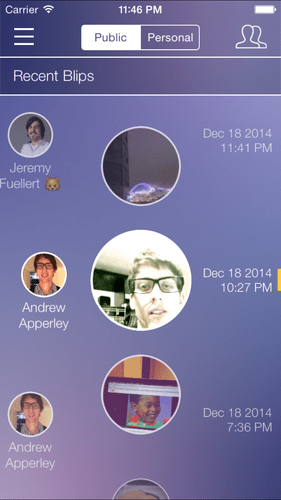
<p>A few months had passed since I started the project with a basic understanding of what I wanted to accomplish and the building blocks of a server and client side application to show off to people. Nothing really worked, the designs weren’t the greatest, and the server was held together by strings yet a colleague of mine still wanted to join the project to flush out Blips to its fullest potential. Having him join the team was such a blessing as he has an eye for design, knows when something can be better, and brought top notch iOS skills to the table that really helped propel Blips forward for the better. While I mainly focussed on server side development and integration with the client side, Jeremy focussed on polish client side. The beautiful timeline view in the app is all due to his hard work over a few months.</p>

<p><img src="/assets/img/posts/timeline_view.png" alt="Blips Timeline View" title="The beautiful timeline view in the app is all due to his hard work" /></p>

<p>The project as a whole is completely over-engineered and covers far too much ground feature wise for such an app in it’s first version. We didn’t want to launch an incomplete app but also didn’t want to keep adding features, even though at the time they made sense but by the end even the features that did make it in were too much. We had private and public timelines, per user timelines, favourite timelines, full profiles, CDN based asset management, load balancers with 4-5 servers waiting to be deployed, dedicated database servers, a robust video creation workflow, a very well thought out database schema setup, multiple CRON jobs setup to handle daily tasks, etc. Not everything was unnecessary but we could have shipped with less and added later, which is one of the reasons it took us over a year and a half to complete the project from inception to ship date. Once it launched we submitted two bug fixes and started discussing next steps. From these discussions we came to the conclusion that we were burnt out and didn’t want to touch another personal project for a long time, which I have moved on to other projects but they were mostly experiements or smaller ones. We have learned a lot from this experience but the servers must shutdown soon. At the end of June they will be turned off and the app will be pulled from the App Store. It simply comes down to cost to run the servers vs user traffic, which there is virtually none to speak of. Which is sad but a reality that we have come to terms with. Thank you for everyone that supported the project and to anyone that used it I hope you enjoyed your experience, even if it was brief.</p>

<p><img src="/assets/img/posts/blips_banner.png" alt="Blips Banner" title="Thank you for everyone that supported Blips!" /></p>

<p>Until next time, I must get back to work.</p>]]></content><author><name>Andrew Apperley</name><email>mail@andrewapperley.ca</email></author><category term="blog" /><category term="legacy" /><category term="development" /><category term="update" /><summary type="html"><![CDATA[This was the most stressful, yet most intriguing project I have ever worked on.]]></summary><media:thumbnail xmlns:media="http://search.yahoo.com/mrss/" url="https://www.andrewapperley.ca/assets/img/posts/early_mockup.png" /><media:content medium="image" url="https://www.andrewapperley.ca/assets/img/posts/early_mockup.png" xmlns:media="http://search.yahoo.com/mrss/" /></entry><entry><title type="html">Working with Dart, Polymer, and CloudMusic Progress</title><link href="https://www.andrewapperley.ca/blog/legacy/development/update/2015-03-08-working-with-polymer-and-dart/" rel="alternate" type="text/html" title="Working with Dart, Polymer, and CloudMusic Progress" /><published>2015-03-08T11:25:00+00:00</published><updated>2021-04-19T12:11:11+00:00</updated><id>https://www.andrewapperley.ca/blog/legacy/development/update/working-with-polymer-and-dart</id><content type="html" xml:base="https://www.andrewapperley.ca/blog/legacy/development/update/2015-03-08-working-with-polymer-and-dart/"><![CDATA[<p><em>Overall First Impressions</em></p>

<p>When I started the <em>CloudMusic</em> project I needed to do something new and different. I didn’t want it to simply be an app that I pumped out quickly and did nothing interesting with. The server component is built on a highly modified version of the Blips server, which I cleaned up significantly and made more modular, also much more secure. The server technology was set in stone the day I jotted down the idea for the app but I wasn’t sure about the client. I wanted to experiment with Swift but after a few weeks of struggling with the language I threw out all the code. I began working at Publicis and for the first few weeks I didn’t have a concrete project to work on so I started researching emerging web technologies, where I found Dart then Polymer.</p>

<p>I’m a few months into the project and my overall impressions of the platform are: intimidated, satisfied, and impressed. Dart has a lot of quirks to it, mainly because of the fact that it’s so new and being rapidly developed, but being on the bleeding-edge has it’s advantages. I get to write a web application with a fully class based, statically and dynamically typed, feature rich and modern language where only javascript or languages loosely based off of javascript are used. I am fully aware that Dart is compiled down to javascript when not the app is not run in Dartium but I don’t need to deal with that code unless I’m debugging a browser specific issue, which I have not come across yet. This app is being built for evergreen, mobile browsers and takes advantage of all the newest HTML5 features that are making their way into the spec. One of the most interesting features is the ShadowDom. Polymer uses this extensively and delievers a blazing fast experience which wasn’t even possible before. The shadowDom is a virtual DOM that is encapsulated in a single Element. The <em>lightDom</em> then takes the delta changes and reflects them on the screen. You can manipulate the DOM without as large of a performance hit. This performance gain is very prevalent when using the <strong>Core-List-Dart</strong> component which provides an <em>infinite list</em> without having all the list-items in the DOM at the same time.</p>

<p>With regards to progress being made on CloudMusic - I have the server in a state where I’m happy with it but still need to improve the overall CMS UI, Authentication is finished, the different sections are being populated with real data, and the client’s UI is taking shape. Nothing is set in stone but the app’s look and feel are spot on with what I envisioned in the design phase. The next steps will be playing an actual song from the server, inner page creation: if I select a top level list item that isn’t a song-item I need it to show the next view (ie. I select an Album and I need the songs to be listed in a new view) and a user menu where they can change a few settings.</p>

<p>Until the next time, I must get back to work.</p>]]></content><author><name>Andrew Apperley</name><email>mail@andrewapperley.ca</email></author><category term="blog" /><category term="legacy" /><category term="development" /><category term="update" /><summary type="html"><![CDATA[Overall First Impressions]]></summary><media:thumbnail xmlns:media="http://search.yahoo.com/mrss/" url="https://www.andrewapperley.ca/assets/img/posts/cloud-music-progress-polymer-dart.jpeg" /><media:content medium="image" url="https://www.andrewapperley.ca/assets/img/posts/cloud-music-progress-polymer-dart.jpeg" xmlns:media="http://search.yahoo.com/mrss/" /></entry><entry><title type="html">Integrating Polymer</title><link href="https://www.andrewapperley.ca/blog/legacy/development/update/2015-02-12-integrating-polymer/" rel="alternate" type="text/html" title="Integrating Polymer" /><published>2015-02-12T07:31:00+00:00</published><updated>2021-04-19T12:11:11+00:00</updated><id>https://www.andrewapperley.ca/blog/legacy/development/update/integrating-polymer</id><content type="html" xml:base="https://www.andrewapperley.ca/blog/legacy/development/update/2015-02-12-integrating-polymer/"><![CDATA[<p><em>I’ve discovered Polymer HTML Elements and I’m never going back</em></p>

<p>Polymer is this unique framework for creating truly modular web UI. It allows you to segregate each core UI element on your webpage, which you attach a script and stylesheet to that are sandboxed to that element. What this allows the developer to do is import a UI element in the same fashion they import Classes or other libraries. It’s truly modular web programming but this time at the UI element level.</p>

<p>In addition to the flexibility Polymer provides the developer they also have two UI libraries that work with Polymer out of the box: Core and Paper. Core Elements are mostly unstyled yet complete Polymer elements that can be extended with either Javascript or Dart to fit the developers needs. On the other hand Paper Elements are fully designed and elegant UI components which are based off of Google’s Material Design Specs.</p>

<p>In CloudMusic, I will be using Polymer for the entire frontend design and more specifically Paper Elements. I find the aesthetics of Paper Elements to be very much aligned with my overall vision of CloudMusic’s UI so instead of reinventing the wheel I will be leveraging their design in the creation of the app.</p>

<p>Until next time, I must get back to work.</p>]]></content><author><name>Andrew Apperley</name><email>mail@andrewapperley.ca</email></author><category term="blog" /><category term="legacy" /><category term="development" /><category term="update" /><summary type="html"><![CDATA[I’ve discovered Polymer HTML Elements and I’m never going back]]></summary><media:thumbnail xmlns:media="http://search.yahoo.com/mrss/" url="https://www.andrewapperley.ca/assets/img/posts/polymer1.jpg" /><media:content medium="image" url="https://www.andrewapperley.ca/assets/img/posts/polymer1.jpg" xmlns:media="http://search.yahoo.com/mrss/" /></entry><entry><title type="html">Starting a new project</title><link href="https://www.andrewapperley.ca/blog/legacy/development/update/2015-02-07-starting-a-new-project/" rel="alternate" type="text/html" title="Starting a new project" /><published>2015-02-07T14:27:00+00:00</published><updated>2021-04-19T12:11:11+00:00</updated><id>https://www.andrewapperley.ca/blog/legacy/development/update/starting-a-new-project</id><content type="html" xml:base="https://www.andrewapperley.ca/blog/legacy/development/update/2015-02-07-starting-a-new-project/"><![CDATA[<p><em>A different kind of project than I’m used to.</em></p>

<p>Blips has been completed for sometime now yet with existing changes I still want to make but I needed a break from that
app. I had been working on Blips for roughly a year and a half by the time we launched it and put out our first update.
I was at the point of exhaustion even when thinking about working on it, so I took a break and didn’t work on anything.
Knowing me though I eventually was needing a project to work on, that’s just how I am. I genuinely love working through
problems, solving complex issues, designing experiences, and being innovative. This must be why I’m a software developer.</p>

<p>While I was driving one day I noticed that my music had stopped playing, I ran out of music. This is my fault because
when I got my iPhone 5 I never transferred the music from my iPod onto it or didn’t make sure I had the iPod on me.
Regardless of those two facts, the truth remains the same: I don’t have enough room on my iPhone to store all my music,
have a nice selection of apps, and develop new apps. What I’ve come up with to remedy my situation is slightly backwards
thinking but it also presents me with a unique opportunity to develop a service I might not have thought of otherwise.</p>

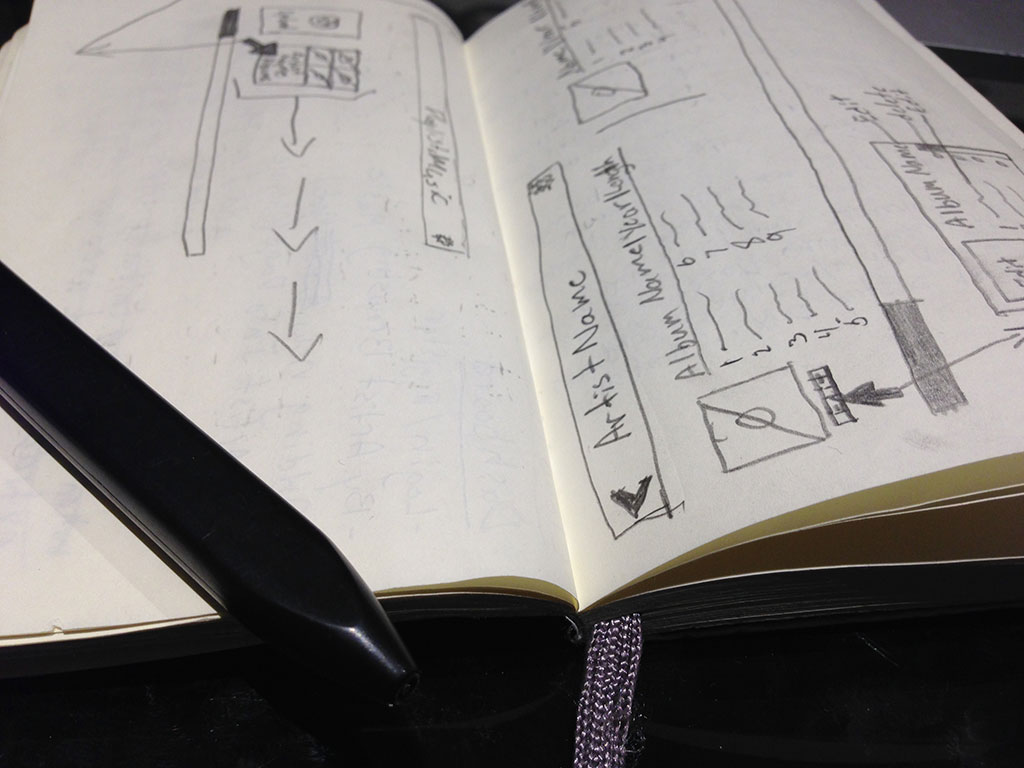
<p><img src="/assets/img/posts/earlydrawings1.jpg" alt="Early drawing of CloudMusic" title="Early concepts of what I wanted the CMS to look like" /></p>

<p>I wanted to create a service or a tool rather that lets you store your music in a central location, have be secure,
easy to use, and work on any device(the streaming portion, not the CMS which I wanted to be desktop only). What I am
calling <em>CloudMusic</em> is just that, or at least it will be. It’s essentially a self-maintained iTunes in the cloud, it actually
uses iTunes’ servers to gather some extra metadata when you upload music files. I’ve only just begun the process of building
CloudMusic out and have a long journey ahead but I have the same feelings that I had when I started writing Blips, back then
it was called <em>Video-a-day</em> or <em>VAD</em> for short, which is joy and wonder and excitement.</p>

<p>I’m taking a lot of risks with this project but that’s what makes it so exciting. It’s not a project for others, while it
sure could be at some point, but it’s for me and will solve a real problem in my life. I’m writing the client in Dart,
the server in Python using Flask+Tornado which is the same server technology the Blips server is built on, and it will
run on a Raspberry Pi. I want to also incorporate a physical aspect to it beyond simply running the server on an embedded
system in my car. I’m thinking of showing basic information on a heads up display using an LCD that connects to the Pi’s
GPIO pins, they are inexpensive and will let me see what’s playing without having to look at my phone, or I might use the
display to tell me when the server is up and running and some stats about what’s going on under the hood.</p>

<p>I’ll keep producing updates on this blog as I make progress with the project, which is why I started the blog in the first
place. Until then I must get back to work.</p>]]></content><author><name>Andrew Apperley</name><email>mail@andrewapperley.ca</email></author><category term="blog" /><category term="legacy" /><category term="development" /><category term="update" /><summary type="html"><![CDATA[A different kind of project than I’m used to.]]></summary><media:thumbnail xmlns:media="http://search.yahoo.com/mrss/" url="https://www.andrewapperley.ca/assets/img/posts/blips1.png" /><media:content medium="image" url="https://www.andrewapperley.ca/assets/img/posts/blips1.png" xmlns:media="http://search.yahoo.com/mrss/" /></entry></feed>