What I learned building a Dreamcast emulator for Apple Watch
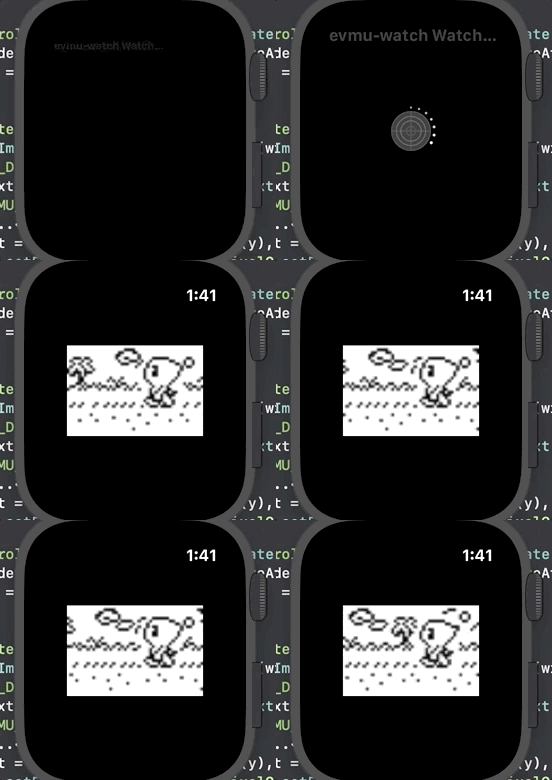
On constrained hardware, creative software, and what a 1999 memory card taught me about modern mobile development.
There’s something philosophically tidy about running a Dreamcast VMU emulator on an Apple Watch. The VMU — Sega’s Visual Memory Unit — was itself a tiny device: a memory card that could detach from your Dreamcast controller and play small games on its own 32×48 pixel LCD screen. It had its own CPU, its own battery, its own tiny buttons. In 1999 it was kind of miraculous. By today’s standards it’s laughably underpowered. And yet there I was, writing Swift, trying to convince a watchOS app to faithfully reproduce the behaviour of a Z80-based chip from two-and-a-half decades ago.
The project is called evmu-watch. It’s a port of the EVMU emulation core — a C-based engine that handles the actual VMU hardware emulation — wrapped in a native watchOS shell I wrote in Swift. The emulation core handles the hard part: the CPU cycles, the memory layout, the timing. My job was bridging that into an app that could run on watchOS without melting the battery or the frame budget.
The screen problem
The VMU’s native display is 32×48 pixels. That’s it. The Apple Watch Series 7 has a 396×484 point display. The naive approach — scale each pixel up by a uniform factor — is also the right approach, but you still have to pick how to do it, and on watchOS you don’t have a lot of tooling latitude.
I ended up using SpriteKit. Each “pixel” in the VMU display is rendered as an SKShapeNode. At a 3× scale factor, the 32×48 source maps to a 96×144 point canvas, which is small enough to center cleanly on the watch face without crowding the UI. The choice to use SpriteKit nodes instead of drawing into a bitmap gave me a clean way to apply a ghosting effect — that characteristic LCD smear that real VMU screens had. It’s a tiny thing, but on a fidelity project like this, those tiny things matter.
The more interesting rendering challenge was figuring out when not to update. The VMU has a screensaver state and an active game state. Re-drawing all 1,536 nodes every frame regardless of state was wasteful. So the renderer checks the emulator state on each tick and only triggers a full scene update when the display has actually changed. Simple optimization, but meaningful on hardware where the thermal budget is measured in milliwatts.
Input on a tiny screen
The VMU has eight inputs: a D-pad (four directions), two face buttons, sleep, and mode. Mapping those to a watch face without a physical controller is a puzzle. My first pass used on-screen tap regions for the main inputs and a pan gesture for sleep and mode. That worked but felt clunky.
What ended up being more interesting was the pan gesture disambiguation — detecting whether a swipe was heading left or right quickly enough to feel responsive without triggering false positives during normal D-pad use. I solved it by tracking gesture velocity at the end of each recognizer event and only committing to a sleep/mode action when the velocity cleared a threshold. Below the threshold, the gesture is ignored and the player just… doesn’t notice. Above it, the intent is clear.
There’s an input queue underneath all of this — button presses are enqueued and drained at fixed intervals — which decouples the UI event timing from the emulation cycle timing. This is a pattern I’ve come back to in production iOS work: separating when something is requested from when something is processed is almost always worth the indirection.
What constrained hardware teaches you
Working on evmu-watch gave me something that writing standard UIKit apps doesn’t: a real forcing function for performance thinking. When your target device has no CPU slack, no memory headroom, and a user who will notice if the battery drains 20% faster than expected, every allocation and every render tick has a cost you can’t ignore.
The lessons generalize. When I was working on ad rendering at Pinterest — making sure ad formats scrolled at 60fps on both new and old devices — I was drawing on the same instincts. When the Dropbox Dash team was designing the persistent layer for our AI features, the offline-first and caching patterns I reached for weren’t from a textbook; they were things I understood because I’d had to care about them at a low level.
The watch project also forced me to get comfortable with the C/Swift interop layer in a way that higher-level iOS work doesn’t require. The emulation core is C. My UI is Swift. The bridge layer — the header files, the type coercions, the careful memory management around objects that don’t play nicely with ARC — that’s the kind of plumbing that most app developers never touch. Touching it made me better at understanding what’s actually happening under the abstraction layer in my day job.
Why bother
The honest answer is that I built evmu-watch because I wanted to. I owned a Dreamcast. I loved the VMU’s weird little secondscreen games. And I wanted to see if I could make one of those games run on my watch.
But the slightly less honest answer — the one that’s also true — is that I build these kinds of projects because they make me a more capable engineer for the work that actually pays. Constrained environments are where software craft gets sharpened. When the hardware forgives nothing, you learn not to take it for granted.
If you have a collection of VMU ROMs you’ve been sitting on, the project is on GitHub. No judgment on where the ROMs came from.